The last few months, I have been working on a project to treat text on computers as more than just an electronic analogue of paper.
The idea is to make text structured and interactive. Text is not just a blob of characters thrown on the paper/screen for reading, but one of many ways communicate. Text is a medium for the conveyance of ideas and these ideas do not stand alone. These thoughts are referenced continually within a workflow.
I have read many papers and books (on my computer, tablet, and e-ink screens, of course) over the past few months on the problems faced in the fields of information science, interactive information retrieval, digital libraries, active reading, and information extraction. To achieve the goal of making a document reader that I would be happy with, I need to implement several tasks which I will detail in the following sections.
Annotations
Annotations are the natural first step towards this goal. Annotations are markers where we leave our thoughts. These thoughts can be spontaneous "stream-of-consciousness" notes or they can be detailed thoughts that are meant to tie multiple ideas together.
Annotations need to be easy to create. If you are reading and you have to mess around with the interface, you will not be making annotations as often as you would on paper.
Furthermore, annotations need to have the option to be shareable. There is certainly a distinction made between annotations made for others and those that are meant to be private. This kind of interaction must be supported so that the choice of whether to share or not is straightforward.
Catalogue and search
Once you start using a computer to collect all your reading material, inenvitably, the documents start piling up. It becomes difficult to return to the same documents quickly. It is imperative that finding the same documents again must be fast.
To support this, there needs to be an extensible metadata and indexing tool. This tool should not only contain bibliography metadata that is usually expected from a catalouge, but also develop concept maps from the text. This is a difficult task and will require lots of language modelling, but it is necessary for dealing with an area that has lots of related information that is inherent in the meaning of the text.
An easier first approach to this comes from the old and well-studied field of bibliometrics. Instead of trying to figure out what the meaning of the text is, the indexer can start by using citation parsing to find out the semantic structure between documents by seeing how they are referenced in the text.
Together, these two approaches can lead to better approaches to the problem of document similarity, or finding other documents that are semantically close to each other. This is useful because it speeds up the process of finding ideas to tie together. Instead of trying to hunt down the appropriate documents, they can be presented to the user as they are reading.
Finding more reading material
Usually, when trying to find new documents to add to one's collection, researchers use search engines and try to explore a topic. Interactive information retrieval is full of models of the cognitive states involved in this process and there is a general agreement that it starts with a question and an uncertain state of knowledge (USK). This is a state where the researcher does not know enough about the field to know exactly what to search for. The process to get out of this state is to search for related terms and read the findings to understand more of the field to find out more about the field of interest. Then, with this knowledge in hand, perform more searches to see if they can approximate the original question better or if they need to reformulate the question.
I believe that there are tools that can aid this kind of interaction. Usually the questions being posed by the researcher have a context and it is my hope that this context can come from what the researcher has been reading and writing. Using this information, a search engine can possibly provide better results by trying to use this contextual information both expand the original search in the case where the query is too narrow ( query expansion ) and then filter the results by looking at usage patterns of the terms ( entity recognition ).
A specific workflow
I’m going to separate the workflow into tasks:
- finding new papers:
- current: I use PubMed and Google Scholar to find recent papers and the lab’s collaborative reference manager to find older articles.
- desired: I would like a more unified interface that lets me scroll through abstracts and categorise papers quickly. This would include the ability to hide papers either individually or based on certain criteria (authors, journal, etc.).
- storing and retrieving papers from my collection
- current: Since I use a wiki, all I do is keep the papers in directory on my server that I sync with all my computers.
- desired: The current setup is fine, because a folder of PDFs is the most portable solution for all my devices, but it is not the most optimal for finding a specific paper. It would better if there were a way to keep the folder setup, but have it managed by a program that can match up citation keys and be used to only show papers that I need to read and then send these to my devices. I think that OPDS http://opds-spec.org/ (along with OpenSearch support) and Z39.50/SRU could be useful in this regard.
- following a citation:
- current: I have scroll back and forth to see what paper a given citation refers to. This is really slow on the Kindle’s e-ink screen and not much faster with PDFs on other devices (many journal’s actually do not accept PDF manuscripts that have hyperlinks). The HTML version of papers that some journals provide alleviate this problem somewhat, but PDFs are the standard for most scientific literature.
- desired: Automatic lookup (from either online or personal collection) with the ability to jump back.
- adding annotations:
- current: On a screen, annotations are rudimentary and slow to use (this may be better on a tablet, but most tablets these days are not built with high-resolution digitizer).
- desired: Even if annotations are possible on any single device, one can not use these across different platforms, nor share the annotations easily. Annotations need to portable, searchable, and support cross-references.
Other related topics
- document layout — There is some information that is relevant for navigation that is implicit in the document's structure and dealing with documents that are not "born-digital" will require the automatic extraction of this structure. This can be quite difficult even for PDFs that are born-digital.
Crossposted from blogs.perl.org.
Hi everyone, this is my first blog post on here (Gabor Szabo++ for reminding me that I need to blog!). Last week, I posted to the Houston.pm group inviting them to come out to the local City of Houston Open Innovation Hackathon.
I was planning on attending since I first heard about it a couple of weeks ago, but I saw this also as an opportunity to build cool things in Perl and show what Perl can do.
To those that don't interact much with the Perl community, Perl is completely invisible or just seen in the form of short scripts that do a single task. Showing people by doing is a great way to demonstrate how much Perl has progressed in recent years with all tools that have been uploaded to CPAN and that Perl systems can grow beautifully beyond 1,000 SLOC.
Going to hackathons like these also make for a great way to network with the local technology community and see what type of problems they are interested in solving. I would love to see what type of approaches they take in their technology stack and whether those approaches can be adapted and made Perlish.
A few months back, I had read Vyacheslav Matyukhin's announcement of the Play Perl project and I immediately thought that the idea of a social network for programming was a sound one1, but I was not sure if it would just languish and become another site that nobody visits. The recent release and widespread adoption of the site by the Perl community gives me optimism for the kind of cooperation this site can bring to Perl. Play Perl brings a unique way to spring the community into action — which excites me. I would like to note that these ideas are not unique in application to Perl, but could be used for any distributed collaborative effort.
There already exist tools for open-source where we can share tasks and wishlist items: either project specific such as bug trackers or cross-project such as OpenHatch, 24 Pull Requests, and the various project proposals made for GSOC. What does Play Perl add to what's already out there?
Firstly, it frees the projects from belonging to a single person. People already create todo lists with projects that they would like to work on, but these todo lists usually remain private. In an open-source environment, this can make it difficult to find other people that might be interested in helping those ideas get off the ground. With Play Perl, the todo list item (or “quest”) no longer has to stay with the person that came up with it. Anyone can see what may need to be done and if they have enough round tuits, they can work on it. A quote that I recently read on the Wikipedia article for Alexander Kronrod sums up how I see this:
A biographer wrote Kronrod gave ideas "away left and right, quite honestly being convinced that the authorship belongs to the one who implements them."
In this sense, Play Perl is an ideas bank, but it is much more than that. By allowing these ideas to be voted on, it allows you to choose which one to work on first. You can prioritise your time based on what would be most beneficial to the community — a metric that is difficult to ascertain on your own.
Secondly, with the gamification2 of collaboration, the process of implementing ideas becomes part of a feedback loop — we can introduce positive reinforcement for our work through the interaction with the community. This feedback loop process already happens through media such as mailing lists and IRC (karmabots, anyone?). Play Perl quantifies this and lets us see how much our contributions help others.
The last and possibly the most important aspect of Play Perl that leads me to believe in its long-term success is its focus on tasks from a single community. Everyone in the community can quickly see what the others are working on in a way that is hard to do with blogs or GitHub3 due to granularity. Ideas often get lost with time, but more eyes can ensure that they get implemented. I frequently browse the latest CPAN uploads to look for interesting modules and I find myself following the feed on Play Perl the same way. I can justify the time spent browsing through all this activity on both sites because I know that there is likely an item of interest (high probability of reward) and each item is a blip of text that I can quickly scan through (low cost to reading each item). Looking at modules lets me see what code already exists, but Play Perl lets me see what code will probably exist in the future. Providing this new view on the workflow of open-source development is empowering because it provides a channel for the free flow of a specific kind of information that was previously trapped in other less-visible media. Having easy access to this information means we can interact with it directly at a scale that best fits the message.
I look forward to seeing Play Perl flourish in the coming months.
This blog post brought to you by Play Perl. ;-)
It has worked for GitHub, hasn't it? ↩
On a side note, Carl Mäsak has written about the gamification of development with TDD in particular in Perl 6 is my MMORPG and Helpfully addictive: TDD on crack. ↩
GitHub should implement custom lists of people/projects to filter the activity like on Twitter. ↩
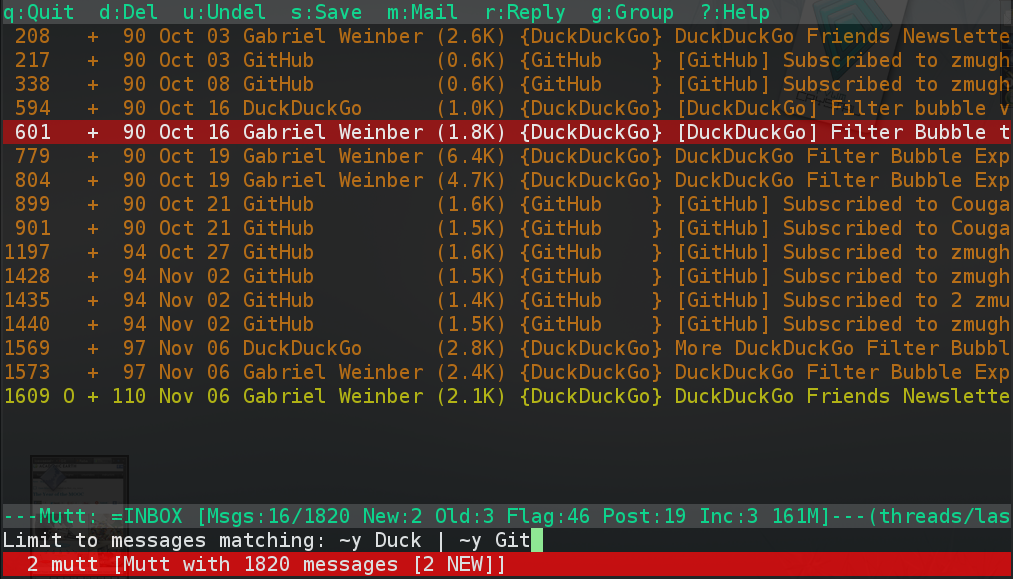 |
About a year ago (October 2011), I wrote a small tool (git repo) that has really made using my e-mail a much more enjoyable experience. My personal e-mail inbox is on Google's Gmail service; however, I find the web interface gets in the way of reading and organising my e-mail. I make heavy use of the label and filter features that let me automatically tag each message (or thread), but having labels that number in the hundreds gets unwieldy since I can not easily access them. I use the IMAP interface to reach my inbox through the mutt e-mail client; this is fast because there is almost no interface and I can bind many actions to a couple of keystrokes.
The main problem I had with using IMAP was that, although I could see all the
labels presented as IMAP folders, I had no way to know which labels were used
on a particular message that was still in my inbox. I had thought about this
problem for a while and looked around to see if anyone made proxies for IMAP,
but there was not very much information out there. I had originally thought
that I would need to keep a periodically updated database of Message-IDs
and labels which I would query from inside mutt and I had in fact written
some code that would get all the Message-IDs for a particular IMAP folder,
but this was a slow process. I didn't look into it again until I was talking
about my problem with a friend (Paul
DeCarlo) and he pointed me towards the Gmail
IMAP extensions. This
was actually going to be possible!
I quickly put together a pass-through proxy that would sit between the mutt client and the Gmail IMAP server. Since Gmail's server uses SSL with IMAP (i.e. IMAPS) to encrypt the communication, I would need to get the unencrypted commands from mutt and then encrypt them before sending them to Gmail. Once I had this, I could log the commands to a file and study which IMAP commands mutt was sending. At the same time, I had a window open with IETF RFC3501, the IMAP specification document, so that I could understand the structure of the protocol. Once I saved the log to a file, I didn't actually need a network to program the filter that I was writing — in fact, I finished the core of the program on a drive back from the ACM Programming Contest in Longview, TX! When I got home, I tested it and it worked almost perfectly except for another IMAP command that mutt was sending that was not in my log, but that was just a small fix.
Not very long after I first published the code on Github, my code was mentioned on the mutt developers mailing list on 2012-02-01.
Todd Hoffman writes:
I read the keywords patch description and it definitely sounds useful. One reminder is that gmail labels are not in the headers and can only be accessed using the imap fetch command. Users of offlineimap or some other mechanism to retrieve the messages and put them in mboxes or a maildir structure will not be able to extract them from headers, in general. Of course, a patched version of offlineimap or an imap proxy (see https://github.com/zmughal/gmail-imap-label) that assigns the labels to a header could be used also.
It was good to know that people were finding my project. Also, over the summer, I received my first ever bug report from Matthias Vallentin, so I knew that somebody else actually found it useful. \o/ This was a great feeling, because it closed the loop on the open-source model for me: I was finally contributing code and interacting with other developers.
In one of my projects, I needed to trace HTTPS requests in order to understand the behaviour of a web application. Since the data is encrypted, it can not be read using the default configuration of the tools that I normally use to inspect network data. This post details how to quickly set up an SSL proxy to monitor the encrypted traffic.
Background
When debugging or reverse engineering a network protocol, it is often necessary to look at the requests being made in order to see where they are going and what type of parameters are being sent. Usually this is simple with a packet capture tool such as tcpdump or Wireshark when the protocol is being sent in plaintext; however, it is more work to capture and decode SSL packets as the purpose of this protocol layer is to prevent the type of eavesdropping that is accomplished in man-in-the-middle attacks. SSL works on the basis of public certificates that are issued by trusted organisations known as certificate authorities (CAs). The purpose of the CAs is to sign certificates so that any clients that connect to a server that has a signed certificate can trust that they are connecting to an entity with verified credentials; therefore, a certificate can only be as trustworthy as the CA that signed it. Operating systems and browsers come with a list of CA certificates that are considered trustworthy by consensus; so, in order to run a server with verifiable SSL communication, the owners of that server need to get their certificate signed by one of the CAs in that list. Any traffic to and from that server will now be accepted by the client in encrypted form.
Software
Trying to capture these encrypted packets would require you to have the private key of a trusted CA; however, we can get around this by installing our own CA certificate and using a proxy that signs certificates using that CA certificate for every server that the client connects to. We can accomplish this by using mitm-proxy.
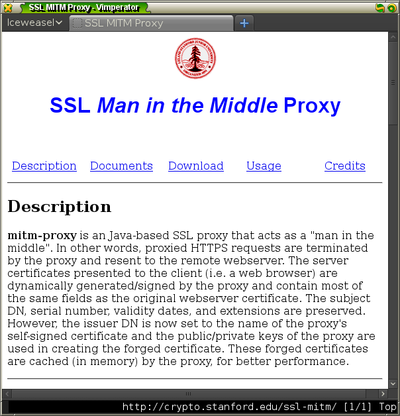
It is written Java and comes with a CA certificate that you can use right away which makes it is straightforward to set up.
Once you download and extract the software, you have to add the fake CA certificate into Firefox. I prefer to set up a new session of Firefox so that the configuration will use a separate database of certificates from my usual browsing session. You can create and start a new session using the command
firefox -P -no-remote
.
Installing the certificate
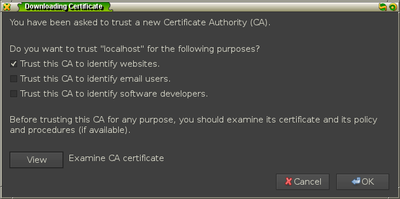
When this new session starts up, add the certificate by going into the
Preferences menu of Firefox and going to the options under Advanced » Encryption
and selecting the View Certificates button.
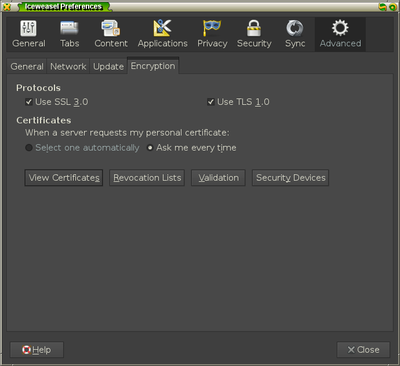
Under the Authorities tab, click the Import button and select the file
FakeCA.cer from the mitm-proxy directory.
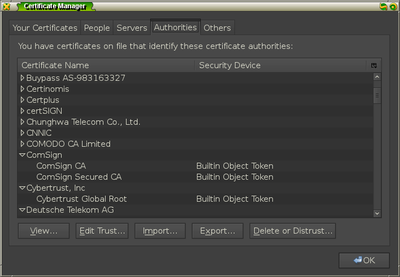
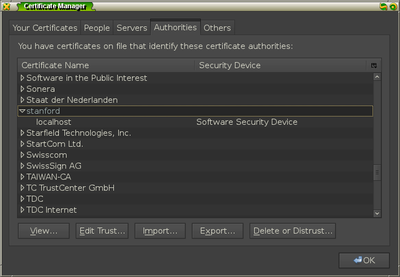
Once you add the certificate for identifying websites, you should see it in the
list of authorities under the item name stanford.
Running the proxy
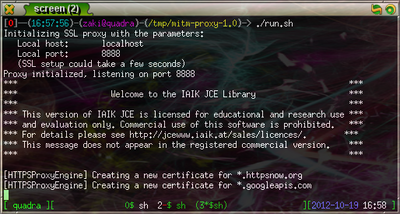
You are now ready to run the proxy. A shell script called run.sh is contained
in the mitm-proxy directory and by examining it1, you
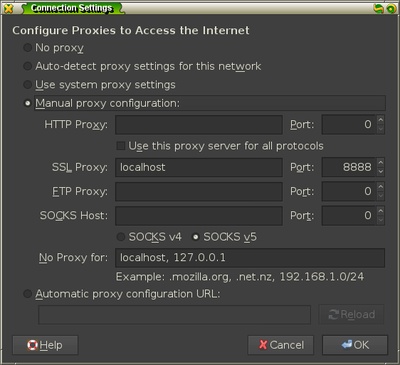
can see that it starts a proxy on localhost:8888 using the fake CA certificate and
that it will log the HTTPS requests to output.txt. You need to add this proxy
to your Firefox instance by going to Advanced » Network » Settings and adding
the information under the SSL proxy configuration.
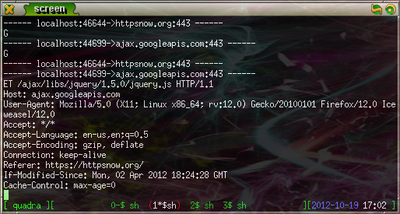
Once you start the server, you can test it by going to HTTPSNow, a website that promotes HTTPS usage for secure browsing. Now, by running
tail -f output.txt
, you can see the HTTPS requests and responses as they are sent.
You should examine all shell scripts you download for security reasons. You do not want to inadvertently delete your $HOME directory! ↩
I recently had to
change
some of the code in my scraping software for Blackboard because newer versions of
Mozilla Firefox1 were not interacting well somewhere in between
MozRepl and
WWW::Mechanize::Firefox. My
decision to use WWW::Mechanize::Firefox was primarily prompted by ease of
development. By being able to look at the DOM and match elements using all of
Firefox's great development tools such as Firebug, I
was able to quickly write XPath queries to get
exactly the information I needed. Plus, Firefox would handle all the
difficulties of recursive frames and JavaScript. This had drawbacks in that it
was slow and it became difficult to really know if something completed
successfully which made me hesitant about putting it in a cronjob. It worked,
but there was something kludgey about the whole thing.
That solution worked last semester, but when I tried it at the beginning of
this semester, things started breaking down. At first, I tried working around
it, but it was too broken. I needed to use JavaScript, so the only solution I
could find was WWW::Scripter. It has a plugin
system that lets you use two different JavaScript engines: a pure-Perl engine
called JE and Mozilla's
SpiderMonkey. I had tried using
WWW::Scripter before, but had encountered difficulties with compiling the
SpiderMonkey bridge. This time I gave the JE engine a try and I was surprised
that it worked flawlessly on the site I was scraping.
After fixing up my code, I can see a few places where WWW::Scripter could become a better tool:
- Add a plugin that makes managing and using frames easier.
- Create tool to make viewing and interacting with the rendered page as you go along possible. This will really make the it easier to debug and try out things in a REPL.
- Integrate with WWW::Mechanize::TreeBuilder so
that I can use HTML::TreeBuilder::XPath
immediately. As far as I can tell, all that needs to be added to
WWW::Scripteris thedecoded_contentmethod.
Which, if you have not heard, is undergoing a rapid development schedule. ↩